Expert Hours packages
Flexible hours for ongoing support across technology and marketing. Starter, Growth and Scale.

 Loading
Access a coordinated technology and marketing team for your nonprofit without building one in-house — with the Maxiva Client Portal, clear Expert Hours pricing and no long-term contract or minimum term.
Your project manager
One point of contact
Example: Growth package · logged in the Client Portal
Each client has one dedicated project manager as the main point of contact, who brings in the people needed to deliver the work.
Your project manager coordinates developers, business analysts, marketers, designers and other specialists within an agreed scope and the Expert Hours you purchase. This isn't full-time staffing or unlimited service: each engagement defines what's included.
All work runs through the Maxiva Client Portal at portal.maxiva.tech, live and in use. You can see what's in progress, what it has used and what comes next.
Client Login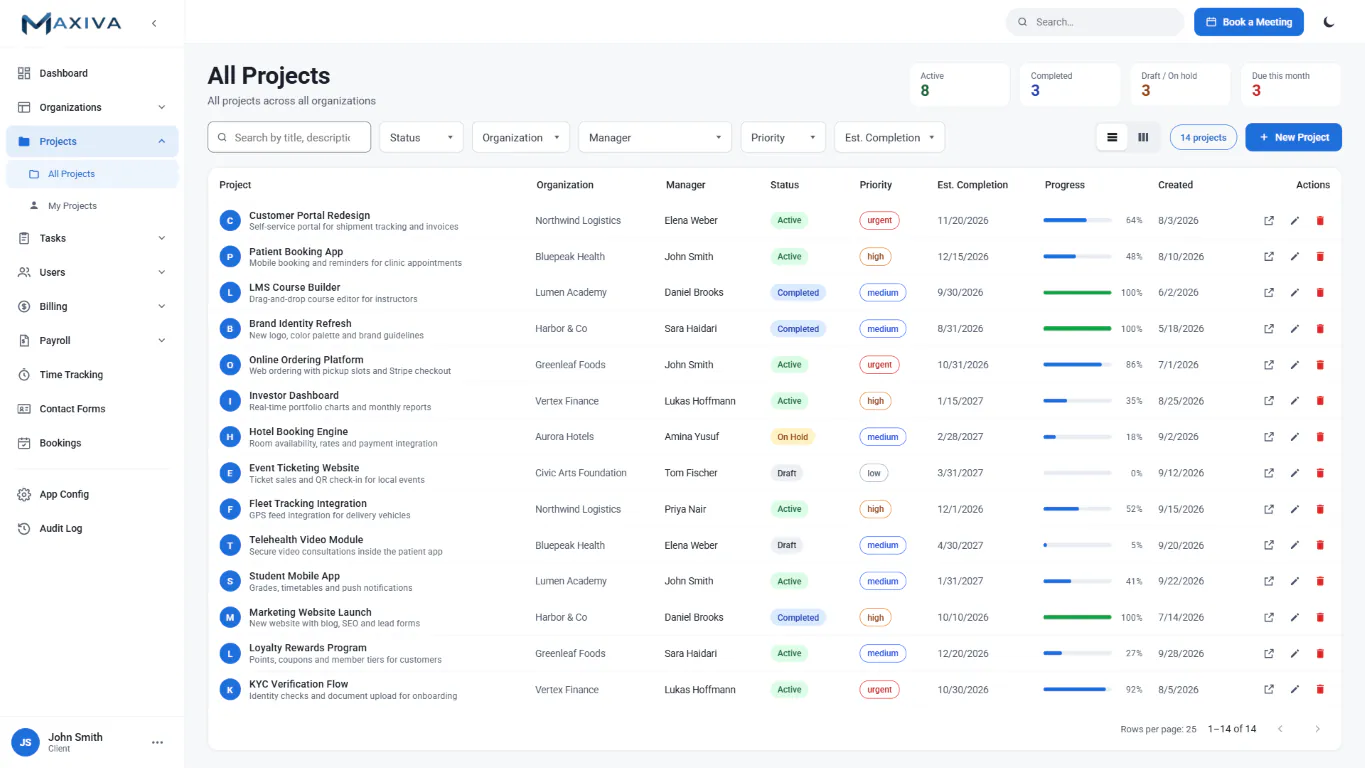
Create projects and see what's in progress.
Invite and onboard your team members.
Submit requests as priorities come up.
Create, assign and follow tasks.
Attach and share documents in one place.
Book time with your project manager or specialists.
Chat with Maxiva specialists inside each task.
See the hours and work the Maxiva team logs.
Buy or top up Expert Hours when you need them.
Automatic reminders at 75% of hours used and 14 days before expiry.
How we begin, agree deliverables, and continue supporting your team over time.
Map your manual work online and see your current baseline. The Maxiva team reviews your answers.
Receive recommendations by email, then talk them through on a free 30–45 minute call.
One defined improvement, delivered and measured — for example, a donation operations, reporting or donor follow-up improvement — with a fixed scope and an Expert Hours ceiling or a fixed price.
Continuing improvement across technology and marketing, led by your project manager and topped up in the Client Portal.
Roadmap option: For needs across several systems, a Roadmap (about 10–20 Expert Hours) sets out your current state, gaps, a phased plan, and effort and cost estimates.
What onboarding looks like week by week
Welcome email, Client Portal accounts created and your team onboarded.
Kick-off with your project manager: goals, baseline measures from your assessment, and first priorities entered as tasks.
A first deliverable — ideally a quick win from your assessment, such as an automated receipt or a cleaned contact list.
Check-in on progress, hours used and next priorities.
Clear deliverables and boundaries upfront
Transparent billing rules with no hidden fees
The online Impact Assessment, Maxiva's review, your recommendations and a Discovery Call to discuss them.
Deeper diagnostics that need system access or data review, starting engagements, roadmaps, projects and ongoing support through Expert Hours.
Buy a flexible block of Expert Hours and apply them wherever they are needed most, or book a fixed-scope project for a defined outcome. You control the budget and the goal, with no long-term contract.
Flexible hours for ongoing support across technology and marketing. Starter, Growth and Scale.
A defined outcome, with set deliverables and price agreed before we start.
Buy Expert Hours when you need them and use them wherever they're needed across technology and marketing. The more hours in a package, the lower the hourly rate. No long-term contract or minimum term: a short set of standard service terms is accepted at purchase.
10 Expert Hours
$1,400
$140 per hour
For example: system administration, fixes, small automations, a monthly report.
30 Expert Hours
$3,900
$130 per hour
For example: integrations, dashboards, campaign support.
50 Expert Hours
$6,000
$120 per hour
For example: roadmap delivery, development, marketing execution, strategy reviews. Can be aligned with your fiscal year or grant period.
Standard rate outside a package: $140 per hour. Typical uses are examples, not limits.
Expert Hours cover specialist time on your work, such as project coordination, analysis, development, testing, documentation and marketing execution.
The Maxiva team logs its hours in the Client Portal, so you can see them as they're used and purchase more when you need them.
Have a referral code? Enter it to receive 10% bonus hours on your first package. Referral codes work on every Expert Hours package, for technology or marketing work, and are entered at purchase in the Client Portal.
Marketing packages use the same Expert Hours, prices and validity. See Marketing, and start with a free Marketing Audit.
Your donor, supporter and program data stays yours. Here is how the Maxiva team handles it.
Only the people working on your project get access, and only to the systems their work needs.
Named accounts with multi-factor sign-in — never shared logins.
Everyone on the team works under a confidentiality agreement.
Your data stays in your systems. We don't keep copies of donor or beneficiary records on our own devices.
When an engagement ends, we hand over all admin access and documentation, and remove our accounts.
No. You buy Expert Hours packages whenever you need them, under short standard service terms accepted at purchase, with no minimum commitment. Each engagement defines the work included, responsibilities, communication and how additional requests are handled.
Your project manager keeps a shared list of priorities and reviews it with you. New requests go into the Client Portal, and work outside the agreed scope is quoted and approved before work starts.
You can top up in the Client Portal at any time. Your remaining hours move to the later of the two expiry dates, so a top-up doesn't shorten an existing expiry. If you regularly use your hours early, a larger package lowers your hourly rate.
You have a 14-day grace period: buy a new package within 14 days of expiry to reactivate the expired hours. The portal reminds you at 75% of hours used and 14 days before expiry. Expired hours aren't refunded or transferred.
Yes. On request, a Scale package's expiry date can be aligned with your fiscal year or grant period.
No. Maxiva isn't tied to one platform. We work with the systems you already use — for example Salesforce, RingCentral, Twilio, Mailchimp, Stripe and Microsoft 365 — and build what's missing. For Salesforce, you work with an Official Salesforce Partner.
Only the Maxiva team members working on your project can access your systems, using named accounts with multi-factor sign-in, under a confidentiality agreement. When an engagement ends, we hand over admin access and remove our accounts. For Maxiva Giving, the system runs in your own environment, your data is encrypted, and card payments are processed by trusted providers such as Stripe. See how we protect your data.
With the free Maxiva Impact Assessment. It maps your manual work and gives you a reviewed baseline to plan from. See how the assessment works.
The free Maxiva Impact Assessment maps your manual work and shows your current baseline. The Maxiva team then reviews it and sends practical recommendations.